
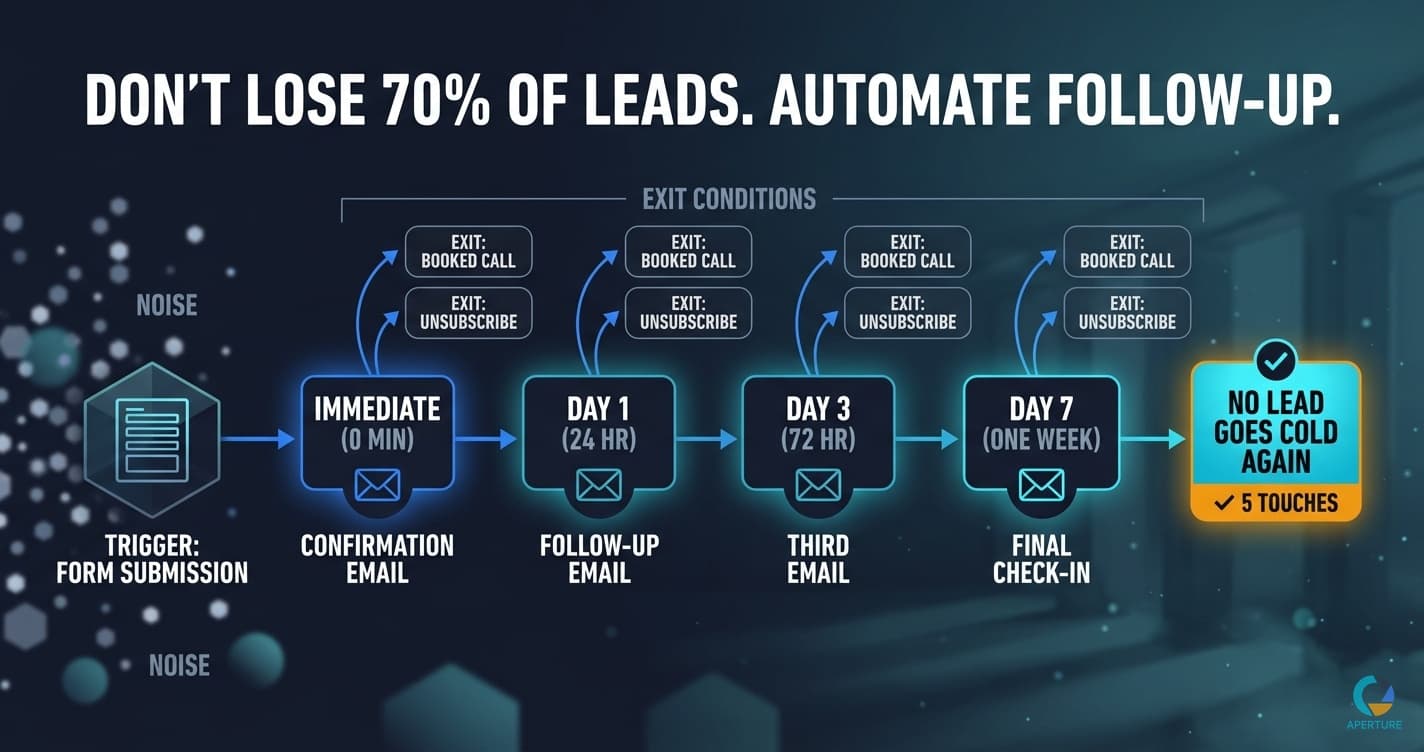
Most service businesses lose 40 to 70 percent of their leads not because the leads weren't interested, but because the follow-up didn't happen consistently. A lead submits a form on Tuesday. Someone plans to follow up on Wednesday. Wednesday gets busy. Thursday comes. The lead has already talked to someone else.
This is not a people problem. It is a process problem. And it is one of the most direct problems automation solves.
Why Does Lead Follow-Up Break Down Without Automation?
Manual follow-up depends on three things that are all unreliable: someone remembering to do it, having time when they remember, and prioritizing the right lead at the right moment.
Research puts the required number of follow-up contacts for a service business sale at five or more. Most businesses stop after one or two. Not because they don't know better. Because the fourth and fifth follow-up requires someone to keep track of a lead's status across days or weeks, remember where each lead is in the sequence, and carve out time to send personalized messages to people who haven't responded.
That's operationally expensive at low volume and impossible at high volume. Automation makes it consistent at any volume.
What Does an Automated Lead Follow-Up Sequence Look Like?
The basic structure for a service business:
Immediate (0 minutes): Lead submits inquiry form. Confirmation email sent automatically with next steps and a link to schedule a call.
Day 1 (24 hours): No response yet. Follow-up email sent asking if they saw the first message and reiterating the offer to talk.
Day 3 (72 hours): No response yet. Third email sent. Shorter, direct, acknowledges they may be busy, offers an easy next step.
Day 7 (one week): Final check-in. Honest tone: "Last one from me. If the timing isn't right, no problem. Here's the link if you want to reconnect later."
Exit trigger: If the lead books a call at any point in the sequence, the follow-up stops. A separate onboarding or qualification sequence begins.
That's it. Five automated touches, no manual work, and no lead goes cold because someone forgot to follow up.
What Makes a Good Lead Follow-Up Sequence?
Three things determine whether the sequence works:
Clear exit conditions. The sequence needs to know when to stop. Booked a call: stop. Responded and said not interested: stop. Reached day fourteen with no engagement: move to nurture list, stop active follow-up. If you don't define these in advance, you end up with a sequence that runs indefinitely or stops at the wrong moment.
Useful emails, not just follow-ups. The second and third emails should give the lead something beyond "just checking in." A relevant article. A specific question about their situation. A concrete answer to a question you've heard from other leads in their position. Make each touch worth receiving.
Correct trigger. The sequence should start the moment the lead takes their first action, not when someone manually enters the lead into a CRM. A delay of even a few hours between lead submission and first contact significantly drops response rates. Automation eliminates that delay because the trigger is the form submission itself, not a human decision.
How I Learned That Consistent Follow-Up Beats Better Pitching
When I was building my agency, I tried to grow by making our pitch better, our case studies more compelling, our pricing more competitive. All of that helped at the margin.
What actually moved the needle was building a cold outreach system that followed up consistently. I had purchased domain lists from SEMrush and SpyFu, roughly 150,000 to 200,000 business domains filtered by companies already spending on Google Ads. Then I built an overseas cold calling team to work the list.
The insight was simple: these businesses were already sold on Google Ads. I did not have to sell the concept. I only had to show up consistently and be the one who followed through. Most agencies were inconsistent. They sent one email, made one call, and moved on. We followed up more times than felt comfortable.
Cost per lead dropped 30% within thirty days. Appointment bookings went up 50%. Not because we had a better offer. Because the follow-up actually happened every time.
Consistency is a competitive advantage in a world where most businesses follow up once and give up.
How Do You Build This Without Code?
The most common no-code stack for lead follow-up automation:
For businesses with a CRM: HubSpot, Pipedrive, and ActiveCampaign all have built-in sequence or workflow tools. You can create a lead follow-up sequence entirely inside your CRM: define the trigger (form submission, new contact created), add the email steps with time delays, set the exit conditions. No external tools required.
For businesses connecting multiple tools: Zapier or Make. A lead submits a form in Typeform or a website form, Zapier catches the submission, creates a CRM record, and enrolls the contact in a sequence. The sequence emails go through Gmail or whatever email tool you use.
The build time for a basic five-touch sequence is usually one day for someone doing it for the first time. With a process map in hand, it's faster because you're not making decisions about the logic during the build.
What About Personalization at Scale?
Template-based sequences work. AI-personalized sequences work better.
The base automation handles the structure and timing. AI handles the variable content. A personalized follow-up sequence might work like this: the intake form data gets passed to a GPT prompt that generates a personalized first-touch email referencing the specific service the lead mentioned, their industry, and the problem they described. The template becomes a starting point and the AI makes it specific.
This is the three-phase approach applied to lead follow-up. Build the reliable automated sequence first. Layer AI personalization on top once the sequence is running.
Start with templates. The goal in phase one is consistent follow-up, not perfect follow-up. A consistent template sequence that follows up five times beats an inconsistent "personalized" sequence that happens twice.
Where Does This Fit in Your Broader Automation Stack?
Lead follow-up is usually the second or third automation a service business builds, depending on where the biggest automation opportunity lies in their operations. The first is often client onboarding, which runs after a lead converts. Lead follow-up runs before conversion.
Together they cover the full front-end client journey: lead comes in, follow-up sequence runs until they book, booking triggers onboarding, onboarding runs until kickoff. The entire journey from first contact to active client runs without manual steps.
That's real operational leverage. And it starts with the follow-up sequence, because that's where most service businesses are currently losing the most opportunity.
Start a conversation with Steve at Aperture OS → to find your highest-value follow-up gaps and build the sequence that fixes them.
Evan Van Dyke is the founder of Aperture OS. He spent seven years running a marketing agency, scaling 100+ businesses, eventually systemizing it to three hours a week, and sold it in 2021. He now builds AI automation systems for business owners. About Evan →
Frequently Asked Questions
Q: Why do most service businesses lose so many leads? Inconsistent follow-up. Research shows 80% of sales require five or more follow-up contacts. Most service businesses stop after one or two. Not a motivation problem. A process problem. Automation makes follow-up consistent at any volume without depending on someone remembering to do it.
Q: What does a lead follow-up automation actually look like? A basic sequence: immediate confirmation, 24-hour follow-up, 72-hour follow-up, seven-day final check-in. Exit trigger when the lead books a call. Built in a CRM or Zapier. No manual sending required. The sequence runs for every lead every time.
Q: What is the best tool for automating lead follow-up? Depends on what you already use. If you have a CRM like HubSpot or Pipedrive, build the sequence inside it. If you need to connect multiple tools, use Zapier or Make. The tool matters less than having the sequence fully mapped before you build it.
Q: Should I personalize automated follow-up emails? Start with templates for consistency. Add AI personalization once the sequence is running. A consistent template sequence that follows up five times outperforms an inconsistent personalized sequence that happens twice. Build the reliable layer first, then optimize.
Q: How do I know when to stop following up with a lead? Define the exit condition before building. A common rule: five touches over fourteen days with no response moves the lead to a nurture list. An active response requesting removal triggers immediate unsubscribe. Document this in the process map so the sequence has a defined exit, not an infinite loop. See how to map processes before building →