
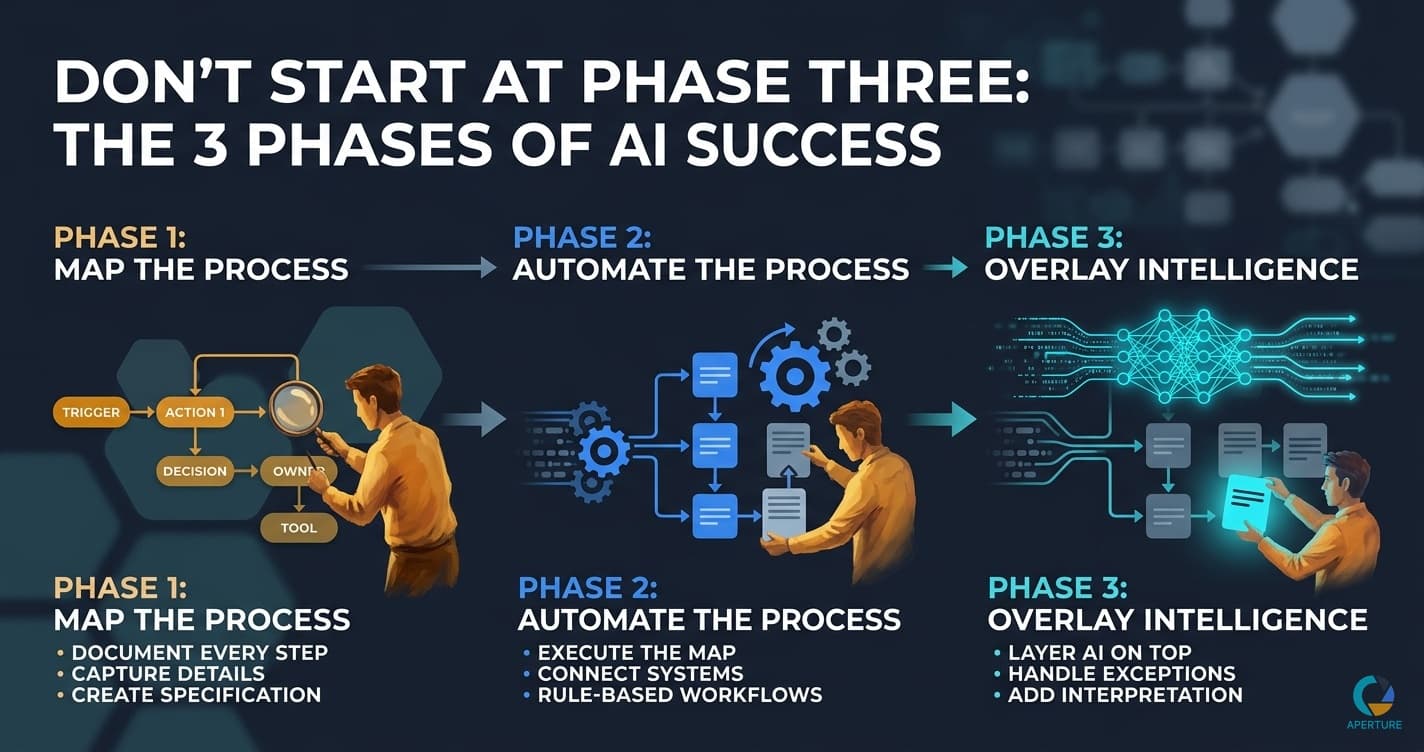
There is a right order to implementing AI in your business. Most people get it backwards, skip the middle, and land at step three wondering why it doesn't work.
The three phases are not arbitrary. Each one creates the foundation the next one requires. Skipping phase one or two and jumping to AI is like building a second floor on nothing. The result is not a building. It's a brief impressive structure followed by a collapse.
What Are the Three Phases?
Phase one: Map the process. Document every step. The trigger that starts it. Each action in sequence. Who owns each step. What tools are used. Where decisions happen. What the edge cases are. A complete process map is the specification that everything else is built from.
Phase two: Automate the process. With the map built, automation becomes execution. You know exactly what to connect, in what order, with what logic. Zapier, Make, n8n, or custom code: these tools are powerful when they have a specification. Without one, they're guesses.
Phase three: Overlay intelligence. Once the automation is running reliably, layer AI on top. Handle exceptions. Personalize outputs. Make in-bounds decisions faster. This is where AI does what it's actually good at, and only after a working, documented process already exists beneath it.
Why Do Most People Start at Phase Three?
Because phase three is the part that sounds exciting. "We're using AI to handle our [X]" is a better sentence than "we spent three weeks documenting our processes."
The AI products marketed to small businesses reinforce this. Sign up, describe your business in a paragraph, let the AI optimize your operations. It sounds like a shortcut to phases one and two. It isn't.
When you give AI an undocumented process, it produces a generic answer. It describes what a typical business in your category might do. It doesn't know that your sales process involves a specific three-day follow-up sequence tied to a particular CRM field, or that your quality control step requires cross-referencing two systems that don't talk to each other.
That specificity is the product. Without it, AI produces content that could apply to any business in your industry. With it, AI produces something that could only come from your business.
What Does Phase One Actually Involve?
Understanding why process mapping comes before automation is the work nobody wants to do and the work that determines whether everything else succeeds.
A complete process map captures:
- The trigger: what event starts this process?
- Every step, in sequence, described specifically
- Who owns each step (a role, not "the team")
- What tool handles each step
- Where decisions diverge and what each path looks like
- What can go wrong and what the documented response is
The most effective way to produce a first draft is a focused conversation with the person who executes the process. Ask them to walk through it from trigger to completion. Ask follow-up questions until every gap is filled.
Then test it. Hand the draft to someone unfamiliar with the process and ask them to follow it. Every question they ask is a missing step. Fill those gaps before moving on.
What Does Phase Two Actually Involve?
Building the automation from the map.
With the map complete, you know exactly what triggers what. You know which system each step lives in. You know the logic at each decision point. The build is execution, not problem-solving.
The most common tools: Zapier or Make for connecting systems without code. These platforms let you create multi-step automations triggered by events (a form submitted, a contract signed, a date reached) and chain them together into workflows.
A simple phase-two automation might be: contract signed in PandaDoc, trigger intake form in Typeform, create CRM record in HubSpot on form submission, create project in Monday, send welcome email via Gmail, notify team in Slack.
That's a full client onboarding automation flow running without any manual steps. It took hours to build. It will run thousands of times.
What Does Phase Three Actually Involve?
Adding AI to the automation that's already working.
Phase three is not replacing the automation. It's extending it. The rule-based steps that Zapier handles continue to run as they were. AI gets layered on top for the steps that require interpretation.
For the client onboarding example: the intake form data now gets summarized by an AI before being passed to the account manager, so the first human touchpoint starts with a pre-analyzed brief instead of raw form responses. Incoming support requests get classified by urgency before routing. Follow-up emails get personalized based on the specific services the client mentioned in intake.
The AI is not running the process. It's handling the parts of the process that previously required a human to interpret something.
How I Applied This to My Own Business
When I was building the BEST Systems Framework at my agency, the sequence was exactly this, even though I didn't call it that at the time.
First: document every process. Every proposal, every client onboarding, every reporting workflow, every QA step. That was Build. It took months and felt slow while it was happening.
Second: once processes were documented, automate what followed rules. Reporting triggers, invoice reminders, project setup sequences. That was Software Automation. It eliminated entire categories of manual work.
Third: once the automation was reliable, improve it. We weren't adding AI at the time, but the principle was the same: edit and optimize once the baseline works, not before.
Going from 60+ hours a week to under three didn't happen because I found a shortcut. It happened because I went in order. The team reduced from 30 to 5 while profit went up because the documented, automated processes could run without me making every decision.
The businesses I see failing at AI automation today are doing what I would have failed at too if I had tried to skip to phase three without phases one and two underneath it.
What Breaks When You Skip Phase One or Two?
Skip phase one (no map): you build automation around assumptions. The automation works in the case you imagined. Every edge case becomes a failure, and you don't know which edge cases exist because you never mapped the process.
Skip phase two (no automation, go straight to AI): the AI has no reliable process to augment. It produces the best answer it can given vague input. The output is generic, inconsistent, and not connected to your actual workflow. There's no system for it to make smarter. It's just a chatbot.
Skip both and go straight to phase three: you get ChatGPT giving you a reasonable approximation of how a business like yours might operate. Useful for brainstorming. Not useful for running your actual business.
What Is the Right Timeline?
For a single moderately complex process, the full three-phase implementation takes two to four weeks:
- Phase one (mapping): two to four hours per process
- Phase two (build): one to five days depending on complexity
- Phase three (AI layer): one to two weeks for a first meaningful integration
The first automation you complete in three phases runs differently than every previous attempt. Not because you found better tools. Because you finally went in order.
Start a conversation with Steve at Aperture OS → to map your first process and build your first implementation in sequence.
Evan Van Dyke is the founder of Aperture OS. He spent seven years running a marketing agency, scaling 100+ businesses, eventually systemizing it to three hours a week, and sold it in 2021. He now builds AI automation systems for business owners. About Evan →
Frequently Asked Questions
Q: What are the three phases of AI implementation in business? Phase one is process mapping. Phase two is traditional automation. Phase three is AI overlay. Each phase creates the foundation the next requires. Phase one produces the specification. Phase two executes it. Phase three extends it with intelligence. The order is not optional.
Q: Why do most businesses fail at AI implementation? They skip to phase three. They expect AI to handle process discovery, documentation, rule-based execution, and intelligent judgment simultaneously. Given an undocumented process, AI produces generic output. Given a fully mapped and automated process, it produces something genuinely useful. The sequence is the difference.
Q: How long does each phase take? Process mapping: two to four hours per process. Traditional automation build: one to five days. AI overlay: hours to two weeks depending on complexity. Total from map to working AI implementation: two to four weeks for a moderately complex process.
Q: Can I implement AI in my business without a technical background? Yes. Process mapping requires no technical skill. Automation builds use no-code tools like Zapier. AI integrations have no-code interfaces available. The most important skill is process clarity, not technical ability. If you can describe how your business works precisely, you can build the automation.
Q: What is the first process I should automate? The one costing the most hours per month that follows consistent rules. Multiply frequency by duration to find monthly exposure. Start with the highest-exposure process that is rule-based and data-moving. Do not start with your most complex process. Start with the one that frees the most time while being straightforward to map. How to find it →