
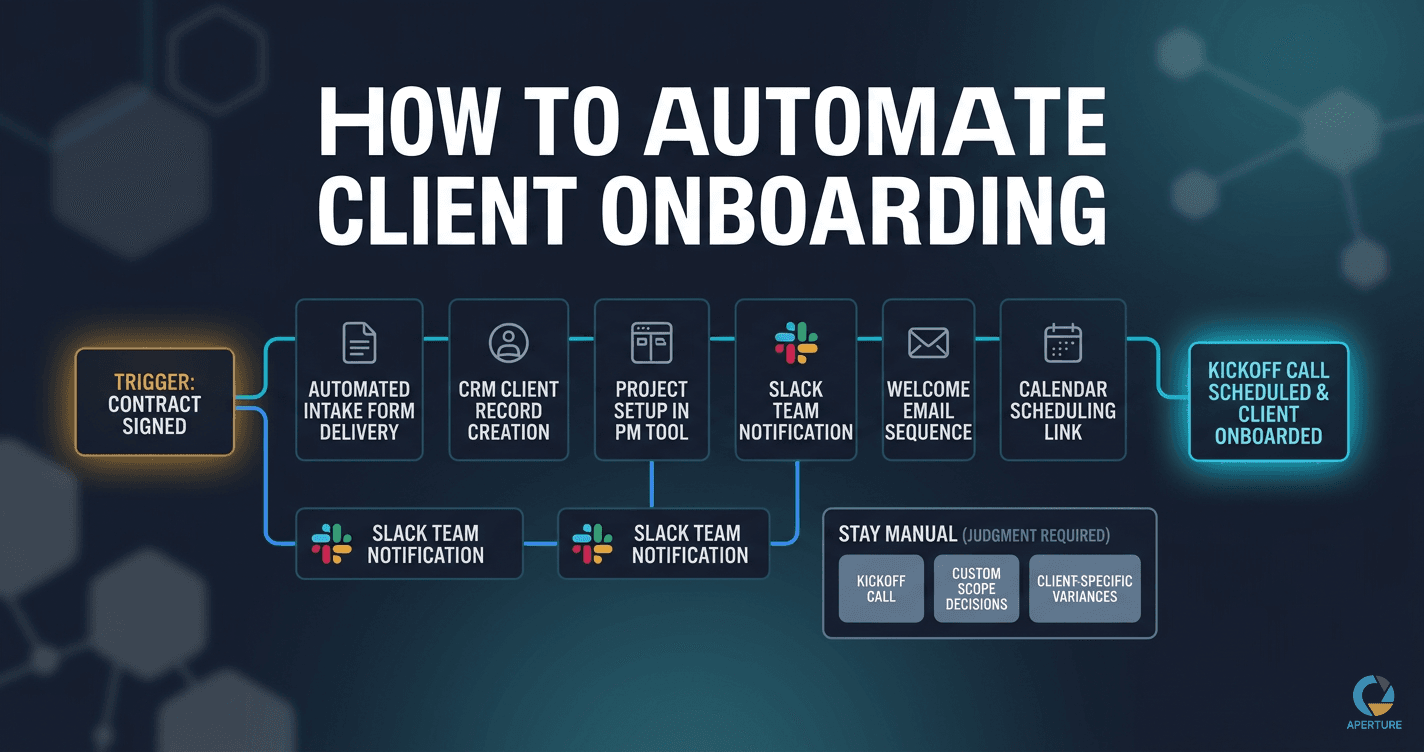
Client onboarding automation is the use of triggered workflows and integration tools to handle every repeatable step of bringing on a new client, from contract signed through kickoff scheduled, without manual intervention. It replaces the email-by-email, task-by-task manual process that most service businesses run today with a defined sequence executing identically every time, whether at 9am on a Monday or 9pm on a Friday.
Client onboarding is where service businesses lose the most time to processes that were never designed. Every new client triggers the same sequence: emails, setup tasks, introductions, access provisioning, documentation. Most of it happens manually, inconsistently, at different quality levels depending on who is handling it that week.
It is also one of the best candidates for automation in any service business. The trigger is defined (contract signed), the steps are repeatable, the tools are usually already in place, and the outcome is binary: the client is onboarded or they aren't. Client onboarding automation handles all of it without a person in the loop. (Running an HVAC shop, plumbing company, or another home-service business? The short-cycle version is covered in customer onboarding automation for service businesses.)
What Is Client Onboarding Automation?
Client onboarding automation connects the tools you already use (contract software, CRM, project management platform, email system, calendar) into a single triggered workflow that fires when a client signs their agreement. Each downstream step happens automatically: intake form delivery, CRM record creation, project setup, welcome email sequence, team notification, and calendar access provisioning. A person shows up for the kickoff call. No one shows up to handle the setup.
The difference between client onboarding automation and a manual onboarding checklist is that the automation does not require anyone to remember. A contract signed at 9pm on a Friday triggers the full downstream sequence immediately. A contract signed during a busy week does not wait until someone has the bandwidth to start the process. The system runs consistently because it runs without you.
Why Is Client Onboarding Worth Automating First?
Three reasons.
It repeats. Every new client runs through it. A process you execute once a year is low automation priority. A process you run every time revenue comes in is different math. If you close eight clients a month and onboarding takes four hours per client, that's thirty-two hours monthly on a process that follows the same rules every time. This applies whether you run an agency, a consulting practice, or any service business that brings on new clients regularly.
It sets the relationship. A slow, inconsistent onboarding experience signals chaos before the engagement even begins. An automated onboarding that runs in hours rather than days signals that you're organized and that working with you will be the same.
The failure cost is visible. When manual onboarding breaks, clients notice. Tasks get missed. Access doesn't get provisioned. The welcome email goes out a week late. These are not invisible process problems. They are client-facing failures. Automating onboarding removes a category of mistake entirely.
What Does a Manual Client Onboarding Process Actually Cost?
The easiest way to calculate it: count the steps, estimate the time per step, multiply by your monthly client volume.
For most service businesses, manual onboarding involves ten to fifteen distinct steps: sending the contract, collecting the signature, sending the intake form, waiting for the response, creating the project in the CRM, adding the client to the project management tool, provisioning platform access, sending the welcome email, scheduling the kickoff call, briefing the team. Many of those steps require someone to notice that the previous step is done before starting the next.
At four to six hours per client and eight clients per month, that's thirty-two to forty-eight hours monthly. Price that at your operational cost per hour. That's what you're spending on tasks that follow the same rules every time.
What Parts of Client Onboarding Can Be Automated?
Not everything should be automated. The parts that automate well are the steps that follow consistent rules and don't require judgment.
Strong automation candidates:
- Contract delivery and signature collection (HelloSign, DocuSign, PandaDoc)
- Intake form delivery triggered by contract signing
- CRM record creation from form submission
- Project setup in Monday, Asana, or ClickUp
- Internal Slack notification to the team
- Welcome email sequence triggered on intake form completion
- Calendar link delivery for kickoff scheduling
Keep these manual:
- The kickoff call itself (relationship-dependent)
- Custom scope decisions (judgment-dependent)
- Any step where the right answer varies meaningfully by client
A good client onboarding automation handles everything from contract signed to kickoff call scheduled. The human shows up for the kickoff call and a clean, complete setup is already done.
What Should Trigger Automatically When a Client Signs a Contract?
The signed contract is the single most reliable onboarding trigger in a service business. It is a defined event, it happens in a system that supports webhooks or integrations (DocuSign, PandaDoc, HelloSign), and it means the client has committed. Everything downstream should fire from this one event.
A contract signature should trigger this sequence without any manual intervention:
- Intake form delivery sent to the client's email within minutes of signing
- CRM record creation or status update marking the contact as an active client
- Internal team notification via Slack or email so the account team knows immediately
- Project creation in your project management tool with templated tasks
- Welcome email sequence starting with next steps and a scheduling link for the kickoff call
- Calendar access so the client can self-schedule their kickoff within your availability
Each of these is a trigger-action pair in Zapier or Make. The contract tool fires a webhook on signature completion. That single webhook fans out to every downstream step. No one checks email. No one remembers to create the project. No one sends a welcome message manually three days late.
The difference between businesses that automate onboarding triggers from contracts and those that don't is consistency. The automated version runs at 9pm on a Friday. The manual version waits until someone notices on Monday.
How Do You Map Your Onboarding Before Building Anything?
The map comes before the tools. This is the step most people skip, and it's why most onboarding automations require six rounds of fixes.
Start by writing down every single step in your current onboarding process, in order, as specifically as possible. Not "send welcome materials" but "send welcome email using the Google Drive template at [path], CC the account manager, attach the onboarding guide PDF."
Then identify the trigger for each step. What causes step two to start? Is it the completion of step one? Is it a calendar date? Is it a client action? If any step currently starts because "I usually check on it every day or two," that is a process gap. Before you automate, you need a defined trigger for every step.
Then identify where things currently break. Where do clients fall through the cracks? Which steps get missed when you're busy? Which steps have you personally had to chase down? Those break points are the highest-value automation targets.
What Happened When I Built Onboarding Automation for a Service Business?
When I was working as a fractional ops consultant, a client had a lead generation problem that turned out to be an onboarding problem in disguise. They were getting interest, but the gap between initial contact and first session was long enough that a lot of leads went cold before they ever became clients.
The process had never been documented. Inquiries came in through a form, then someone manually followed up, then manually scheduled a call, then manually sent intake paperwork. Each step depended on someone noticing that the previous step had happened. On busy weeks, steps got missed.
We built a CRM workflow: form submission triggered an automated email sequence, qualified leads got a scheduling link, the intake form went out automatically after booking confirmation. The team was notified in Slack at each stage. No manual follow-up required for the standard path.
Appointment bookings went up 50%. Not because the product changed. Because the follow-up finally happened consistently, every time, without depending on someone remembering to do it.
How Do You Build Client Onboarding Automation?
With a complete map, the build is execution, not problem-solving. You know every step, every trigger, every tool. You're connecting things you've already specified.
The most common setup for service business onboarding:
- Contract tool (PandaDoc, DocuSign) sends and collects signatures
- Zapier or Make watches for signed contract, triggers next steps
- Form tool (Typeform, Google Forms) sends intake questionnaire automatically
- CRM (HubSpot, Pipedrive) creates client record from intake form data
- Project management (Monday, Asana) creates project from CRM record
- Email sends welcome message with next steps and scheduling link
- Slack notifies the internal team
Each step in Zapier is a trigger and action pair. If you've mapped the process completely, you know exactly what each trigger is and what each action should do. The build takes one to three days for a typical workflow.
If you find yourself making decisions during the build, that's a sign the process wasn't fully mapped. Stop, go back to the map, make the decision at the documentation level, then continue building.
What Does a Fully Automated Onboarding Look Like in Practice?
Client signs the contract at 9pm on a Tuesday.
By 9:05pm, the intake form is in their inbox. By Wednesday morning, when they complete it, the project is created in Monday, the team is notified in Slack, the welcome email has been sent, and the kickoff call scheduling link is live.
Your first human touchpoint is the kickoff call itself, and you show up to it with a fully set-up project, a completed intake, and a client who already feels organized.
That's the automation working. No one on your team manually did any of those steps. No one had to remember to check. No one had to be available at 9pm.
The first automation you build on a documented process runs differently than every attempted shortcut that came before. Not because the tools are better. Because the foundation is there. Ready to build it? Start by finding your first automation opportunity, then map the process before touching a tool.
Start a conversation with Steve at Aperture OS →
Evan Van Dyke is the founder of Aperture OS. He spent seven years running a marketing agency, scaling 100+ businesses, eventually systemizing it to three hours a week, and sold it in 2021. He now builds AI automation systems for business owners. About Evan →
Frequently Asked Questions
Q: What parts of client onboarding can actually be automated? The parts that follow consistent rules and don't require judgment: contract delivery, intake form collection, CRM record creation, project setup, Slack notifications, welcome email sequences, and calendar scheduling. Steps requiring relationship or custom decisions are better handled manually until the decision rules can be documented.
Q: Do I need to map my onboarding process before automating it? Yes. Automation executes a defined process. Building without a map means automating a guess. Every edge case becomes a failure point. Mapping takes two to four hours and determines whether your automation works the first time or needs six rounds of fixes.
Q: What tools do most service businesses use to automate client onboarding? The common combination: a CRM for tracking, a contract tool for signatures, a form tool for intake, and Zapier or Make to connect them. When a contract is signed, Zapier triggers the intake form, creates the project, sends the welcome email, and notifies the team. No custom code required.
Q: How long does it take to build a client onboarding automation? With a complete process map: one to three days. Without a map: two to three weeks and it still won't be reliable. The map makes the build fast because you're executing a plan, not figuring out the logic during implementation.
Q: How is Aperture OS different from just using Zapier for onboarding automation? Zapier executes the automation. Aperture OS figures out what the automation should be. It extracts your onboarding process through a guided conversation, builds the implementation blueprint with you, and identifies exactly which steps to automate versus keep manual. Then you build in Zapier with a specification instead of a guess. See how it works →