
Business process capture is how you pull a process out of a person's head and put it on paper in a form an automation tool, an AI agent, or a new hire can actually follow. It is not the same as process mapping, which draws the diagram. Capture is the extraction. Mapping is the output. Most service businesses skip capture entirely because nobody on the team has time to sit down and interview the person who actually runs the work. This post walks through the 30-minute interview I use to get that knowledge out, and what to do with it once you have it.
What Is Business Process Capture?
Business process capture is the act of extracting a business process from someone's head through structured conversation and converting it into a document that can be followed, automated, or audited. It is the input step. Everything downstream depends on it.
People mix this up with process mapping constantly. Mapping is the visual: the flowchart with the diamonds and the arrows. Capture is what has to happen before the flowchart can exist. You cannot map what you have not pulled into the open.
Here is the test. If you ask the person who runs a process to describe it and they say something like "I just kind of know when to send it," you have not captured anything. You have confirmed the process lives in their head. Capture is the work of translating "I just kind of know" into a sequence someone else can follow.
Why Does Process Capture Come Before Automation?
Every automation tool, every AI agent, every no-code workflow needs a specification. It needs to know what triggers the process, what happens in sequence, what conditions branch the logic, and what to do when something breaks. Without a captured process, you are automating a guess. And guesses fail on the first edge case nobody documented.
The data backs this up. In February 2025, Gartner predicted that through 2026, organizations will abandon 60% of AI projects unsupported by AI-ready data, based on a Q3 2024 survey of 248 data management leaders. Sixty-three percent of those organizations either did not have the right data management practices for AI or were not sure if they did. That is the real AI bottleneck. Not the model. The data the model needs to work from.
For a service business, "AI-ready data" is not a database. It is a captured process. It is the turn-by-turn description of how the work actually happens when you are standing inside it. Nobody automates a quoting workflow they have not captured. Nobody hands a new tech an install process they have not captured. Nobody hands an AI agent a follow-up cadence they have not captured. Process capture is the step every automation conversation assumes has already happened, when it almost never has. It is also a big part of why most AI automation attempts fail. The automation was fine. The input was not there.
What Does a 30-Minute Process Capture Interview Actually Look Like?
Thirty minutes is not a constraint. It is a ceiling. If the process is so complicated that half an hour of focused conversation cannot extract it, the process itself is the problem, and that is its own finding. Most service business processes can be captured in 20 to 30 minutes of disciplined interviewing with the person who actually does the work.
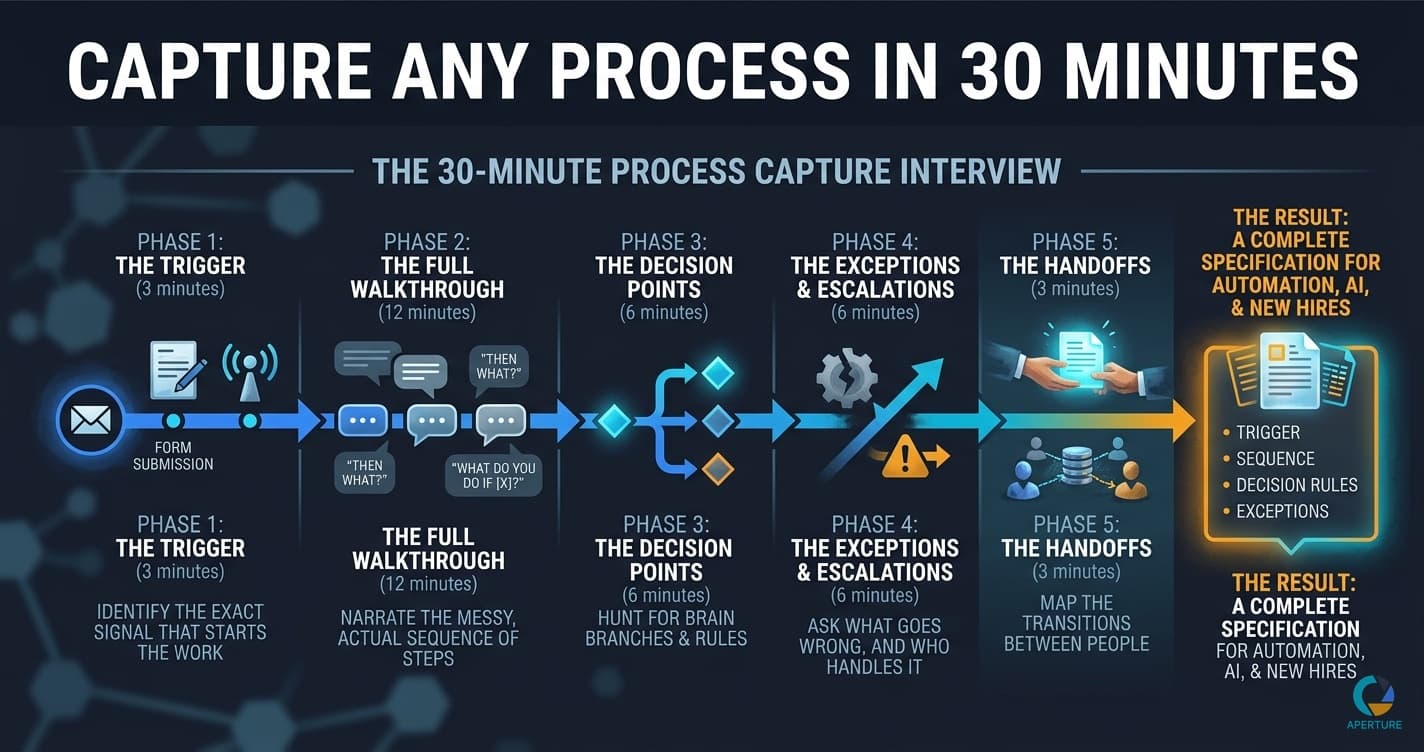
The interview runs in five phases. Each phase has one job.
Phase 1: The Trigger (3 minutes)
Start with the moment the process begins. Not the day, not the general context, the exact trigger. "What is the first thing that tells you this process needs to start?"
The answers you are listening for are concrete. "An email from the client." "A form submission." "The dispatcher puts it on the board." If the answer is abstract, push. "When you say you just know, walk me through the last time you just knew. What was the actual signal?"
You are trying to find the physical event that launches the work. Every automation depends on identifying that event, because that is where the trigger gets built.
Phase 2: The Full Walkthrough (12 minutes)
This is the longest phase because it is the most valuable. You ask the person to narrate the entire process from start to finish. Not the ideal version. The actual version.
Rules for this phase:
- They talk, you take notes and stay quiet.
- You only interrupt to ask "then what?" or "what do you do if [X]?"
- Every time they say "usually" or "normally," you stop and ask what they do in the cases that are not usual. That is where the real process lives.
- You are not editing. You are capturing.
The goal is a raw sequence of steps. It will be messy. That is fine. Mess is the honest version. Clean comes later.
Phase 3: The Decision Points (6 minutes)
Now you go back to the raw sequence and hunt for the branches. "You said you send the quote. How do you decide which template to use?" "You said you schedule the job. How do you decide who gets assigned?"
Every decision point the person makes in their head is a branch in the automation later. If you miss a branch here, the automation will run the wrong path when it hits that case in production. This is the phase where bad capture turns into broken automation.
Phase 4: The Exceptions and Escalations (6 minutes)
Ask what goes wrong. "When does this process fail?" "When do you have to override the normal flow?" "Who do you call when you do not know what to do?"
Every exception is either a rule you have not written yet or a human judgment you will have to route around. Both are useful. The rules become branches. The judgments become escalation points where the automation pauses and asks a person for input. You need to know the difference before you build anything.
Phase 5: The Handoffs (3 minutes)
Finally, map the transitions between people. Who touches this process? What do they do? Where does the work move from one person to another? What has to be true for a clean handoff?
Handoffs are where service businesses lose the most time, because they are the parts nobody owns. Capturing them explicitly is how you stop losing time in the gaps.
How I Found 12 Hours a Week Hiding in My Quoting Process
When I was running my marketing agency, I thought I knew where my time went. I had a team of 30, a seven-figure business, and a dashboard full of metrics. I was also working 60-plus hours a week and losing every battle with my own calendar. So I started tracking where the hours actually went.
The quoting process alone took me 12 hours a week. Twelve hours. Not because it was hard. Because it had seven or eight silent decision points I was making every single time without realizing. Which template to use based on deal size. Which pricing tier for which industry. Whether to include a retainer clause. How much discount room to leave. Whether to send it from me or from the account team. Nobody had ever asked me to write those rules down. I just decided, every quote, in the moment.
The first time I actually sat down and captured that process the way I described above, I found that three of the decisions could be written as rules, four could become a short branching checklist, and one had to stay as human judgment for deals over a certain size. That was the whole problem. Twelve hours a week of my life, locked up in a process I had never once been forced to describe out loud. Within a month, the quoting workflow was running with me touching it maybe 20 minutes a week instead of 12 hours. Same quality. Higher consistency.
That experience is the reason I built the interview method this way. The hours hiding in a business are almost never hiding because the work is hard. They are hiding because nobody has made the person who runs the work say out loud what they do. Process capture is how you find them.
What Do You Do With the Captured Process After the Interview?
You turn the raw notes into a specification. A specification has four parts: the trigger, the sequence, the decision rules, and the exceptions. If those four parts exist, you have something you can hand to an automation builder, a new hire, or an AI agent and expect a reasonable result.
This is also the moment where capture becomes process mapping. Take the sequence from Phase 2 and the branches from Phase 3, and draw them. The diagram is not the point. The diagram is a check. If you cannot draw it cleanly, you have not captured it cleanly, and you go back and re-interview the ambiguous parts.
Executives know they should be automating. A 2022 Gartner survey of 699 executives found that 80% believed automation could be applied to any business decision. The gap is not belief. The gap is that almost nobody does the capture work first, which is why so many companies start at the wrong phase of AI implementation.
What Are the Most Common Process Capture Mistakes?
The biggest mistake is asking the person to describe the process instead of walking through it. Description pulls people up into the abstract. "First I collect the information, then I review it, then I send the quote." That sentence is useless for automation. You need the literal sequence of what happens. Where does the information come from? What do you do while you are reviewing it? What do you check? You get that by walking, not describing.
The second mistake is editing while capturing. The person will say something that sounds inefficient and you will want to fix it on the spot. Do not. Capture first, optimize later. If you start editing mid-interview, they will start self-censoring, and you will lose the honest version of the process.
The third mistake is capturing from the wrong person. The owner is often not the right interviewee. The right interviewee is the person doing the work every day. If the owner does it themselves, they are the right interviewee, with one warning: owners tend to describe what the process should be, not what it is. Watch for that.
The fourth mistake is skipping the exceptions. If you walk away with a clean happy path and no branches, you have not captured a process. You have captured a fantasy of the process.
The cost of leaving processes uncaptured is real. According to a 2024 Slack survey of 2,000 US small business owners, owners lose an average of 96 minutes of productivity daily, about three weeks a year, with 29% repeating messages across platforms and 30% searching for information in the wrong places. Those are capture problems dressed up as productivity problems. The information exists. It is just not in a form anyone can use.
The Asana Anatomy of Work Index, based on a survey of 9,615 global knowledge workers, found that 62% of the workday is lost to repetitive, mundane tasks, with an additional 3.6 hours per week lost to unnecessary meetings. That hidden work is the exact work a process capture interview surfaces on purpose.
Why the Conversation Is the Product
When I started building Aperture OS, the first thing we designed was the interview. Not the features, not the integrations, not the dashboard. The interview. Because every operations consulting engagement I ever ran started the same way: I sat with the owner, I asked the right questions in the right order, and I pulled the process out of their head. The reports, the diagrams, the automation plans, all of it was downstream of that one conversation.
What I realized after years of doing this manually is that the interview is the product. The deliverable is a byproduct of a conversation structured well enough to get a person to say out loud what they already know but have never articulated. Aperture OS is that interview, run by seven coordinated AI agents instead of by me in a room. Steve runs the conversation. Webster researches your business in the background. Atlas verifies the integration paths and builds the implementation plan. The method is the same one you can run yourself in 30 minutes with a notebook. We just automated the capture so it can happen without a consultant in the room.
Ready to capture your first process? Start a conversation with Steve at Aperture OS →
Evan Van Dyke is the founder of Aperture OS. He spent seven years running a marketing agency, scaling 100+ businesses, eventually systemizing it to three hours a week, and sold it in 2021. He now builds AI automation systems for business owners. About Evan →
Frequently Asked Questions
Q: What is the difference between process capture and process mapping? Process capture is the extraction step: pulling a process out of someone's head through structured interview, observation, or recording. Process mapping is the visualization step: turning the captured sequence into a flowchart or diagram. Capture has to happen first. You cannot map something you have not yet pulled into the open.
Q: How long should a process capture interview take? Most service business processes can be captured in 20 to 30 minutes with disciplined interviewing. If half an hour of focused conversation cannot extract the process, the process itself is probably too complex or undefined, which is its own finding. Thirty minutes is a ceiling, not a target.
Q: Who should I interview to capture a business process? The person who actually performs the work every day, not the manager who oversees it. Owners and managers tend to describe processes as they should be, not as they are. If the owner runs the process themselves, interview them, but watch for the gap between the intended process and the actual one.
Q: Why does process capture have to come before automation? Every automation tool and AI agent needs a specification: trigger, sequence, decision rules, and exceptions. Without a captured process, you are automating a guess. Gartner predicts organizations will abandon 60% of AI projects through 2026 because of lack of AI-ready data, and for service businesses, AI-ready data is just a captured process.
Q: What are the five phases of a process capture interview? Phase 1: identify the trigger (3 minutes). Phase 2: walk through the full process start to finish (12 minutes). Phase 3: hunt for decision points and branches (6 minutes). Phase 4: capture exceptions and escalations (6 minutes). Phase 5: map the handoffs between people (3 minutes). Each phase has one job and builds on the previous one. See how it works at Aperture OS →